tags combat, missiles, MOM, master-modes, dogfighting, essentials, ordnance
Missile Operator Mode (MOM) Overview
Missile Operator Mode (MOM) transitions your ship's HUD and target tracking systems from standard gunnery to ordnance control. While in MOM, primary flight weapons are temporarily bypassed so your fire controls can arm, stack, and guide missiles or torpedoes onto target locks.
Entering & Navigating Missile Operator Mode
To deploy missiles, your ship must be operating in SCM Mode (Space Combat Maneuvering) and not in NAV mode.
- Activate MOM: Tap Middle Mouse Button (MB3) while in SCM mode to cycle from Gun Mode to Missile Operator Mode.
- HUD Transition: Your ship crosshair will switch to a missile reticle displaying available ordnance racks, lock status rings, and active seeker types.
- Exit MOM: Tap Middle Mouse Button (MB3) again twice to cycle back to Gun Mode.
Seeker Types & Tracking Mechanics
Different missile types lock onto distinct signatures emitted by target vessels:
- CS (Cross-Section) — Recommended Preliminarily for larger targets
- Detection Method: Physical radar profile / visual outline (Requires active ping to lock)
- Best Used Against: Medium to large hulls (e.g., Freelancers, Reclaimers, Gunships)
- Effectiveness: Highest damage per missile in its size class. Extremely hard for targets to flare off due to low decoy CS signatures.
- Countered By: Hard cover, Noise clouds, high-G maneuvers
- EM (Electromagnetic) — Recommended Preliminarily for small to medium Long-Range targets
- Detection Method: Power signatures (Shields, Power Plants)
- Best Used Against: Agile light fighters and high-shield vessels at long ranges
- Effectiveness: Moderate damage with reliable, passive long-range locking. Ideal for stealth builds launching outside visual detection.
- Countered By: Decoys (Flares), powering down shields/components
- IR (Infrared) — Not Recommended
- Detection Method: Heat signatures (Engines, Thrusters)
- Best Used Against: Niche close-range engagements against hot-running targets
- Effectiveness: Lowest damage output and poorest lock range due to low base target IR signatures.
- Countered By: Decoys (Flares), cooling down thrusters
Want to outfit your ship with missiles?
Visit erkul.games and create your loadout or browse community made loadouts.
Locking, Stacking, and Firing
1. Acquiring a Lock
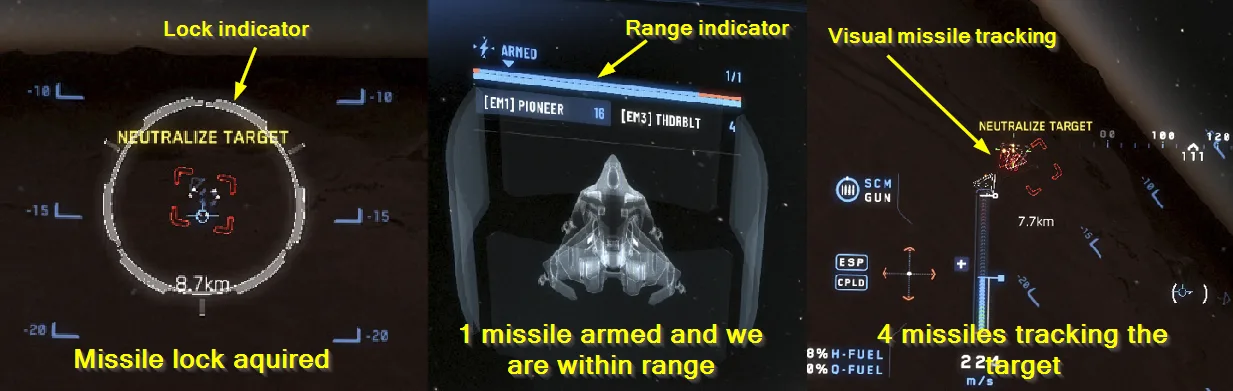
Select a target using T and keep them within your forward targeting cone. Your ship's computer will begin the missile tracking lockon:
- Audio cue: Your ship will tell you when you have a lock on.
2. Cycling Ordnance & Stacking Salvos
- **Cycle Missile Types: If you have multiple missiles on board scroll your mouse wheel to switch between different missile.
- Arm Multiple Missiles (Salvo): Press G to increase the number of missiles queued for a simultaneous launch (up to your rack's maximum limit).
- Reset Armed Count: Press Left-Alt + G to reset queued missiles back to a single shot or press G until you are down back at 1.
3. Launching
Once the lock ring turns solid and your salvo count is set, Click or Hold Left Mouse Button (LMB) to launch.
Example of missile lock and firing
Essential Missile Keybinds
• Toggle Missile Operator Mode: Middle Mouse Button (MB3)
• Cycle Missile Type: Right Mouse Button (RMB)
• Increase Armed Missiles (Salvo): G
• Reset Armed Missiles: Left-Alt + G
• Fire / Launch Missile: Left Mouse Button (LMB)