Requesting ATC Clearance
Before leaving or landing at any station, city, or planetary outpost, you must request clearance from Air Traffic Control (ATC) to open hangar doors or assign a landing pad.
Calling ATC
- Quick Keybind: Press Left-Alt + N while seated in the pilot chair and within 10 km of the location.
- Alternative (mobiGlas): Open your mobiGlas (F1) → Comms app → Friends tab → Click the antenna icon next to the local ATC service (e.g., Area18 Landing Services).
- Alternative (MFD): Hold F on any MFD screen → Select Comms → Click the wireless symbol next to the station name.
Hail via mobiGlas
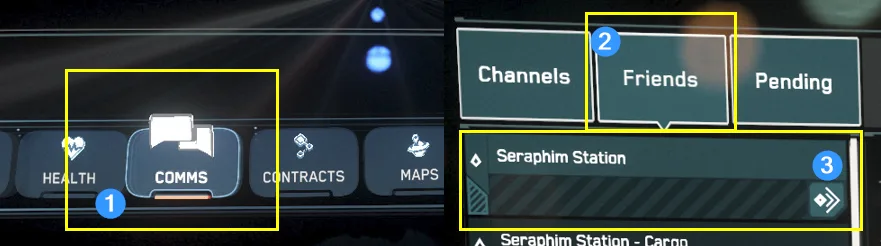
Hangar Departure
Once ATC grants departure clearance:
- Wait for Doors: Look up or around to confirm your hangar doors are fully open before throttling up.
- Vertical Strafe: Use Spacebar (Strafe Up) to lift straight off the pad before pitching or rolling.
- Retract Gear: Press N to retract your landing gear once clear of the hangar threshold.
- Exit hangar: Fly straight out until you exit the station's hangar, plot your destination and spool NAV Mode (Hold B).
How to 3rd person free look
Press F4 while seated in ship, hold Z and move the mouse to look around for the doors.
Safe Landing & Touchdown
Approaching a destination requires controlled speed and proper alignment.
Landing Steps
- Request Pad: Press Left-Alt + N within 10 km to receive a visual landing marker.
- Deploy Landing Gear: Press N to lower your gear. This lowers your speed limits and activates landing UI assistance.
- Approach Marker: Align with your assigned hangar or pad opening. Use Spacebar (Up), Left-Ctrl (Down), and strafe keys (A/D) for precise positioning.
- Auto-Precision / Touchdown: Once hovering directly above the pad/hangar floor, hold Left-Ctrl to lower gently onto the surface, or Hold N to trigger Auto-Land when close to the pad.
- Power Down Engines: Once landed, press I to turn off your engines so atmospheric winds do not blow your ship off the pad.
Tip: Enable Advanced HUD
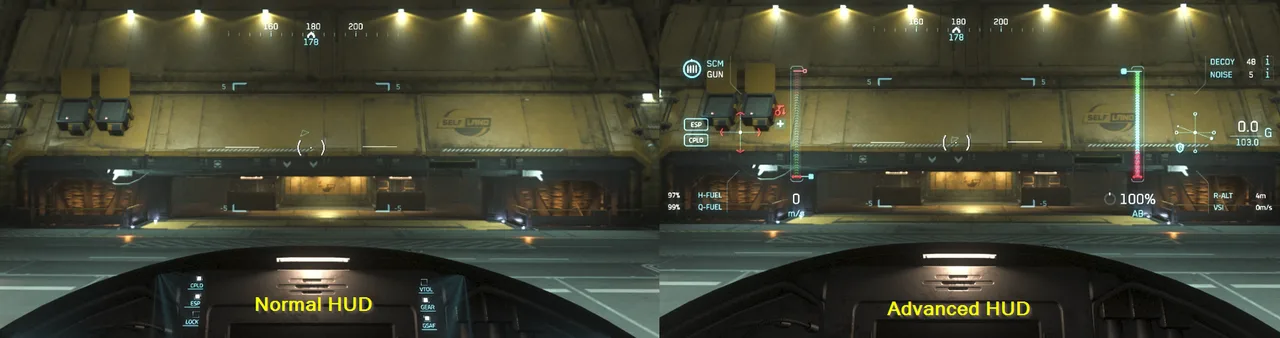
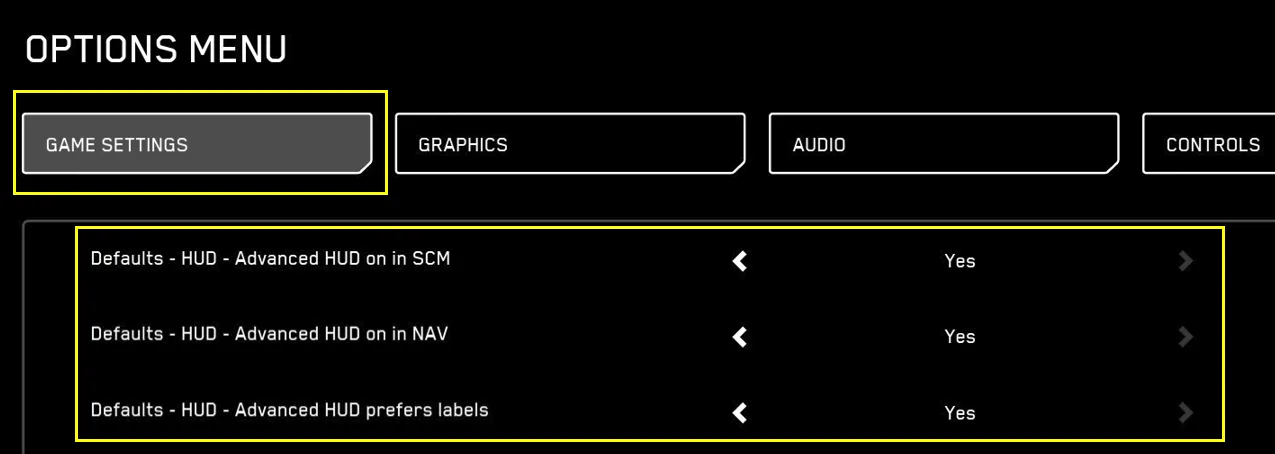
Enabling the advanced hud gives you much better control over your ship by showing additional information.
Essential Landing Keybinds
• Call ATC (Request Clearance): Left-Alt + N
• Landing Gear Toggle: N
• Auto-Land (While near/above Pad): Hold N
• Strafe Up / Lift Off: Spacebar
• Strafe Down / Lower: Left-Ctrl
• Spacebrake (Full Stop): Hold X
• Engine Toggle (Post-Landing): I
• If your ship drifts you may have disabled coupled mode, press Left-Alt + C
• You may also have accidentally enabled cruise control, press C to disable.