Starting Your Ship & Cockpit Controls
Board your ship and sit in the pilot seat using F (Inner Thought). When powered off, all MFD (Multi-Function Display) screens will be dark.
Powering Up
Press Right-Alt + R (Flight-Ready) to initialize all ship systems, shields, weapons, and thrusters at once.
To interact with MFDs or cockpit controls:
- Interaction Mode: Hold F to bring up your cursor and click buttons or adjust menus.
- Zoom Camera: Hold F and scroll Mouse Wheel Up to focus on a screen or switch.
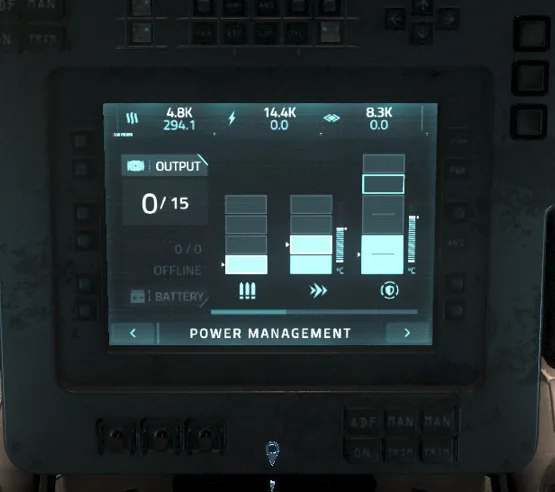
- Pan MFDs: Hover over an MFD and scroll to view oversized menus like Power Management.
Example of the Power Management MFD on the Avenger Titan
Understanding NAV and SCM Modes
Toggle between Master Modes by holding B.
1. SCM Mode (Space Combat Maneuvering)
- Purpose: Dogfighting, missile locking, and precision maneuvering.
- Speed: Capped at maneuver speeds (100–300 m/s) to prevent drifting.
- Systems: Shields, weapons, turrets, and countermeasures are fully active.
2. NAV Mode (Navigation & Quantum)
- Purpose: Fast travel, atmospheric escape, and quantum jumping.
- Speed: Velocity caps are removed (1,000+ m/s or more depending on ship).
- Trade-Off: All power goes to thrusters; shields drop to 0% and weapons power down.
Essential Cockpit Keybinds
• Flight Ready: Right-Alt + R
• Power On/Off: U
• Engines On/Off: I
• Exit Seat: Hold Y
• Master Mode Toggle (NAV / SCM): Hold B
• Speed Limiter Adjust: Mouse Wheel Up / Down
• Cruise Control: C
• Landing Gear: N
• Call ATC (Request Docking/Landing): Left-Alt + N
• Decoupled Mode Toggle: Left-Alt + C
• Spacebrake (Emergency Stop): Hold X