Fleet Management & CCU Planning Overview
Managing a Star Citizen pledge hangar manually can quickly become complex, especially when building cost-effective ship chains or organizing fleet compositions across an organization.
Two primary community platforms simplify this process: CCU Game (for optimizing pledge upgrade chains and saving real-world money) and Fleetyards (for visual fleet tracking, hangar management, and org inventory).
1. CCU Game: Optimizing Upgrade Chains
Cross-Chassis Upgrades (CCUs) allow you to upgrade a lower-value ship to a higher-value ship by paying the price difference. During major sale events (like IAE or ILW), CIG offers Warbond CCUs—discounted upgrades bought with fresh cash that increase the effective value of your chain.
CCU Game automates the math required to stack these discounts:
- Hangar Sync: Using a browser extension, CCU Game imports your current RSI My Hangar inventory, including unapplied upgrades, standalone ships, and buy-back items.
- Chain Calculator: Input a target ship (e.g., Drake Ironclad or RSI Galaxy). The tool analyzes available store upgrades and your inventory to calculate the cheapest sequence of steps.
- Saving Tracking: Shows your total savings percentage compared to standalone pledge store prices.
- Missing Link Alerts: Highlights specific intermediate Warbond upgrades you need to buy during events to complete an active chain.
CCU Discount Example
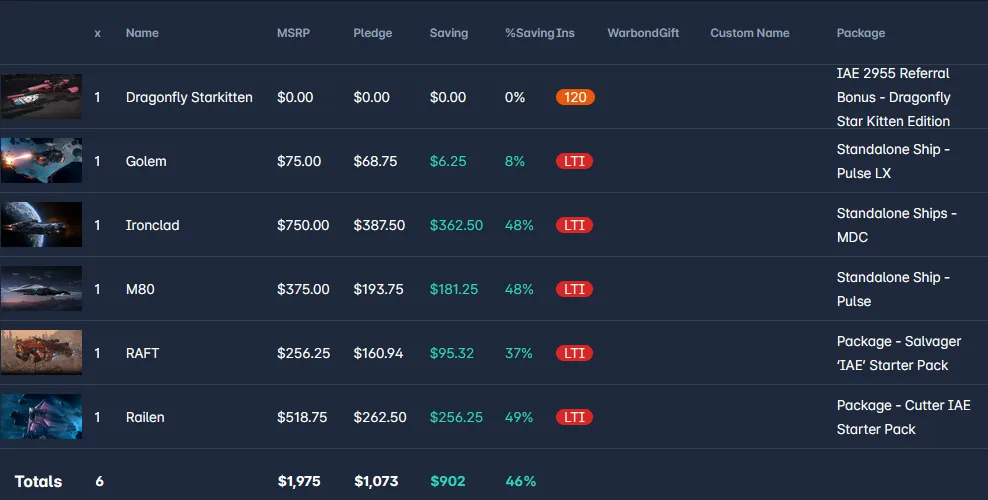
While not a super good example, this is about a 45%+ account wide discount.
Warning: Avoid Grey Market Sellers
Buying pre-chained CCU ships from third-party grey market vendors is almost always a bad deal. Grey market sellers apply substantial markups on top of ship values to secure a profit margin, causing you to pay far more than the actual cost of the upgrade chain. Beyond the financial markup, grey market transactions carry significant risk—gifts can be reclaimed by CIG if the original account was compromised. Building your own CCU chains directly on the RSI store using CCU Game guarantees account security, full ownership, and the lowest possible price point.
2. Fleetyards & MyFleet: Visual Fleet & Hangar Tracking
While CCU Game focuses on the economic pledge layer, platforms like Fleetyards and MyFleet act as visual databases for personal hangars and organizations.
Fleetyards (fleetyards.net)
- Visual Hangar Dashboard: Organize owned, planned, or target ships with high-resolution models, detailed specifications, and role breakdowns.
- Organization Fleet Matrices: Join or create organization groups to aggregate all members' ships into a single operational fleet viewer, showing total cargo capacity (SCU), combat roles, and crew requirements.
- Wishlist & Sale Tracking: Flag target ships on your wishlist to receive notifications when they become available on the RSI pledge store.
MyFleet (myfleet.gg)
- Hangar Import & Analytics: Offers seamless web integration to display your active ship lineup alongside financial hangar statistics and fleet valuation metrics.
- Org Fleet Planning: Highly responsive tool for org commanders to assess real-time fleet capab
Workflow: From Planning to Hangar
[1. Track Owned Fleet on Fleetyards] ➔ [2. Calculate CCU Chain on CCU Game] ➔ [3. Apply Upgrades in RSI Hangar]
- Audit Your Base Pledges: Identify low-cost ships with Lifetime Insurance (LTI) or extended insurance (e.g., 120-month) to use as your chain starting points (LTI tokens).
- Build Your Chain: Use CCU Game during sales to buy standalone upgrade steps between price tiers.
- Apply and Sync: Once all chain links are secured, apply the upgrades in sequence via your RSI web hangar and update your Fleetyards dashboard.
Essential External Links
• CCU Chain Calculator: ccu.game
• Fleet & Ship Database: fleetyards.net & myfleet.gg